
Managing Volunteer Certificates
Some organisations must keep specific certifications or checks up to date. This can be a significant challenge to manage, especially as volunteer numbers increase. This article will explore practical ways to manage your certificates.
Which certificates will your organisation hold
You can control what certificates can be added to your volunteers' profiles. By default, INVOLVE has these certificates:
- First Aid Certificate
- National Police Certificate
- Working with Children Check
You can add to this list or rename the default ones. For example, you could rename the Working with Children Check to Blue Card, as it is commonly referred to in Queensland.
- Navigate to My Organisation and select the Settings tab
- Under the Volunteer heading, select Certificates to bring up the certificates modal
- To add a new attainment or certificate, select the Add item link, add the name and select the save button
- To change the display name of a default certificate type, select the three-dot button at the end of the row to reveal the context menu and select Edit display name, change to what you would like to refer to this certificate as, then select the save button
- When you have finished, select the Done button at the bottom of the modal to return to settings
How to know which volunteers are missing certificates
Need to know which of your volunteers are missing their Police Clearance or other certificate?
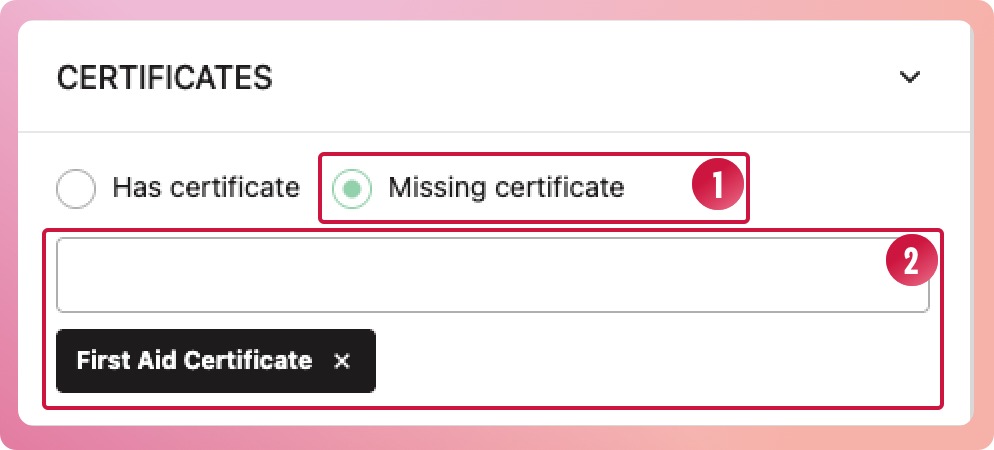
- From your volunteer list, select the More filters... button to open the filter slide-out panel. Open the certificates section and select the Missing certificate radio button
- Select the certificate type from the second drop-down.
- Select the Apply filters button at the bottom of the slide-out panel
- The results will show volunteers who do not have that certificate on their profiles.
How to know when a certificate has expired
We have made this easy for you by providing a short list in the Overview of each program that highlights volunteers with expired or expiring soon certificates.
- When you navigate to a program, you should land on the Overview tab.
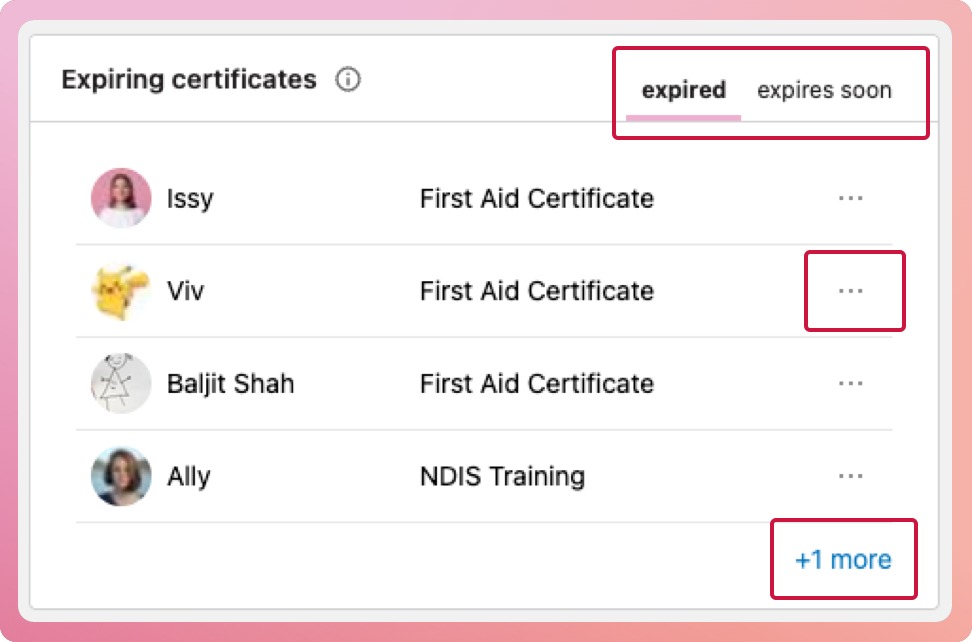
- On the Overview tab, below the program brief is a box titled 'Expiring Certificates'. This box has two tabs, each showing a list of volunteers: one for those who are expired and another for those who are expiring soon.
- The list will show the first four volunteers; if there are more, it will provide a link to a filtered view of the volunteer list.
- You can quickly bring up the certificate modal by selecting the three-dot icon and choosing "Add New Expiry Date" from the context menu.
How soon is soon?
In your organisation's settings, you can choose to see certificates expiring in the next 30, 60 or 90 days.
When do certificates with issue dates expire?
First Aid certificates and National Police clearances in Australia do not have an expiry; rather, they have a recommended timeframe from the issue date for renewal.
First Aid Certificates will show as needing renewal 3 years after the issue date; National Police Certificates will show as needing renewal 1 year from the issue date. These can be changed in your organisation settings.