
Search and filter your volunteers
Search by Volunteer name
Quickly find the volunteer by their name:
- Navigate to your list of volunteers
- In the keyword box, type in the name, or part of the name, of the volunteer you need to find
Filter Volunteers by Location
Search volunteers by the suburb or postcode entered on their volunteer record
- Navigate to your list of volunteers
- Select the 'Location' button, which is next to the search box above the volunteer list
- When the location modal appears, enter a suburb or postcode
- Select the 'Apply filters' button
Filter Volunteers by their Status
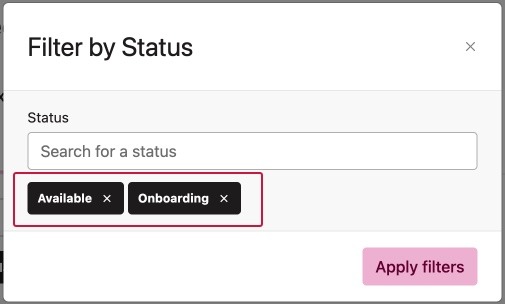
Search volunteers by the status selected on their volunteer record
- Navigate to your list of volunteers
- Select the 'Status' button located next to the search box above the volunteer list
- When the modal appears, select one or more statuses
- Select the 'Apply filters' button
👉 For example, you may want to filter out any volunteers that are set as Unavailable. You can do this by entering all of the active and pending statuses
Filter by Availability
Find volunteers by their availability
- Navigate to your list of volunteers
- Select the 'Availability' button located next to the search box above the volunteer list
- When the modal appears, select one of the options to search by, then the days, followed by the time of day if needed
- Select the 'Apply filters' button. The results will show volunteers available in all the selections
Filter Volunteers by their Skills
Search volunteers by the skills entered in their volunteer profile
- Navigate to your list of volunteers
- Select the 'Skills' button located next to the search box above the volunteer list
- When the modal appears, select one or more skills in the search box.
- Select the 'apply filters' button. The results will show volunteers who have at least one of the skills searched.
Find Volunteers by their Certificates
Search volunteers by certificates entered in their volunteer profile
- Navigate to your list of volunteers
- Select the 'More filters...' button located next to the search box above the volunteer list
- When the slide-out appears, select certificates to open the certificate filter
- Select either Has certificate and the certificate status (Any, Expired, Expiring soon or Valid) or Missing certificate
- Enter one or more certificates in the search box
- Select the 'apply filters' button. The results will show volunteers who have (or are missing) at least one of the certificates searched.
👉 For example, you may want to find a volunteer with a First Aid certificate to fill a certain role at an upcoming event. Select Has certificate, select Valid and enter this type into the certificate search box. Any volunteers with this certificate on their profile will appear in the results.
Find Volunteers by their Interests, Languages, Tags or Training
Search volunteers by the information entered in their volunteer profile
- Navigate to your list of volunteers
- Select the 'More filters...' button located next to the search box above the volunteer list
- When the slide-out appears, select a filter option and enter one or more entries in the search box.
- Select the 'apply filters' button. The results will show volunteers who have at least one of the entries searched.
Filter by Experience or Education
- Navigate to your list of volunteers
- Select the 'More filters...' button located next to the search box above the volunteer list
- When the slide-out appears, select either the Education or Experience option and type in a keyword(s) in the search box.
- Select the 'apply filters' button. The results will show volunteers who have at least one of the keywords searched.
Filter Volunteers by Programs
Search volunteers by the programs they are involved in
- Navigate to your list of volunteers
- Select the 'More filters...' button located next to the search box above the volunteer list
- When the slide-out appears, select Programs and enter one or more programs in the search box
- Select the 'apply filters' button. The results will show volunteers who are in one or more of the programs searched
Filter by Contribution (hours volunteered)
- Navigate to your list of volunteers
- Select the 'More filters...' button located next to the search box above the volunteer list
- When the slide-out appears, select the Contribution option and enter a number in the "more than" and/or "less than" boxes.
- Select the 'apply filters' button. The results will show volunteers who have logged hours within the range you entered.
Filtering by Custom Fields
Search the custom fields you have added. Custom fields are not available on the Starter tier.
- Navigate to your list of volunteers
- Select the 'More filters...' button located next to the search box above the volunteer list
- When the slide-out appears, select the custom field and enter one or more criteria in the search box
- Select the 'apply filters' button. The results will depend on the type of custom field it was:
|
Single-select, Date or Number |
results will show/exclude volunteers who have an exact match to at least one of the criteria searched. |
|
Multi-select or Tags |
results will show/exclude volunteers who have all of the criteria searched. |
|
Text |
results will show/exclude volunteers who have one or more of the keywords searched. |