
Creating timesheets automatically
Timesheets are a great way to capture your volunteer's contribution. Useful for reports and recognition. When you manage many volunteers, recording timesheets can be time-consuming. INVOLVE created a couple of ways to outsource this task.
Timesheets from shifts
If you are setting up shifts for your volunteers, you can automatically create a timesheet entry for each confirmed shift.
How to set up shifts to convert to timesheets automatically
By default, your INVOLVE account has this switched on. If you need to toggle it:
- Navigate to the My Organisation section
- Select the Settings Tab
- Under the VOLUNTEERS heading, switch on 'Automate shift completion and timesheet creation'

How the automation of timesheet creation works
Each night INVOLVE will look at your schedule for that day, pick any shifts that have the status 'Confirmed' and do two things with them:
- Create a timesheet for the rostered hours
- Change the status from 'Confirmed' to 'Completed'
Note: All timesheets automatically created by INVOLVE from confirmed shifts will have a status of Submitted. Timesheets with a status of Submitted or Approved will appear in reports.
Example of shifts that have timesheets automatically created
I had 5 volunteers with various shifts scheduled for today:
- Alice, who has an unconfirmed shift
- Isabella, who has a completed shift after I updated the status when she finished for the day
- Melissa, who has a cancelled shift
- Vanessa, who has a confirmed shift
- Vivian had a shift, but they didn't come in, so I updated the status of her shift to no show
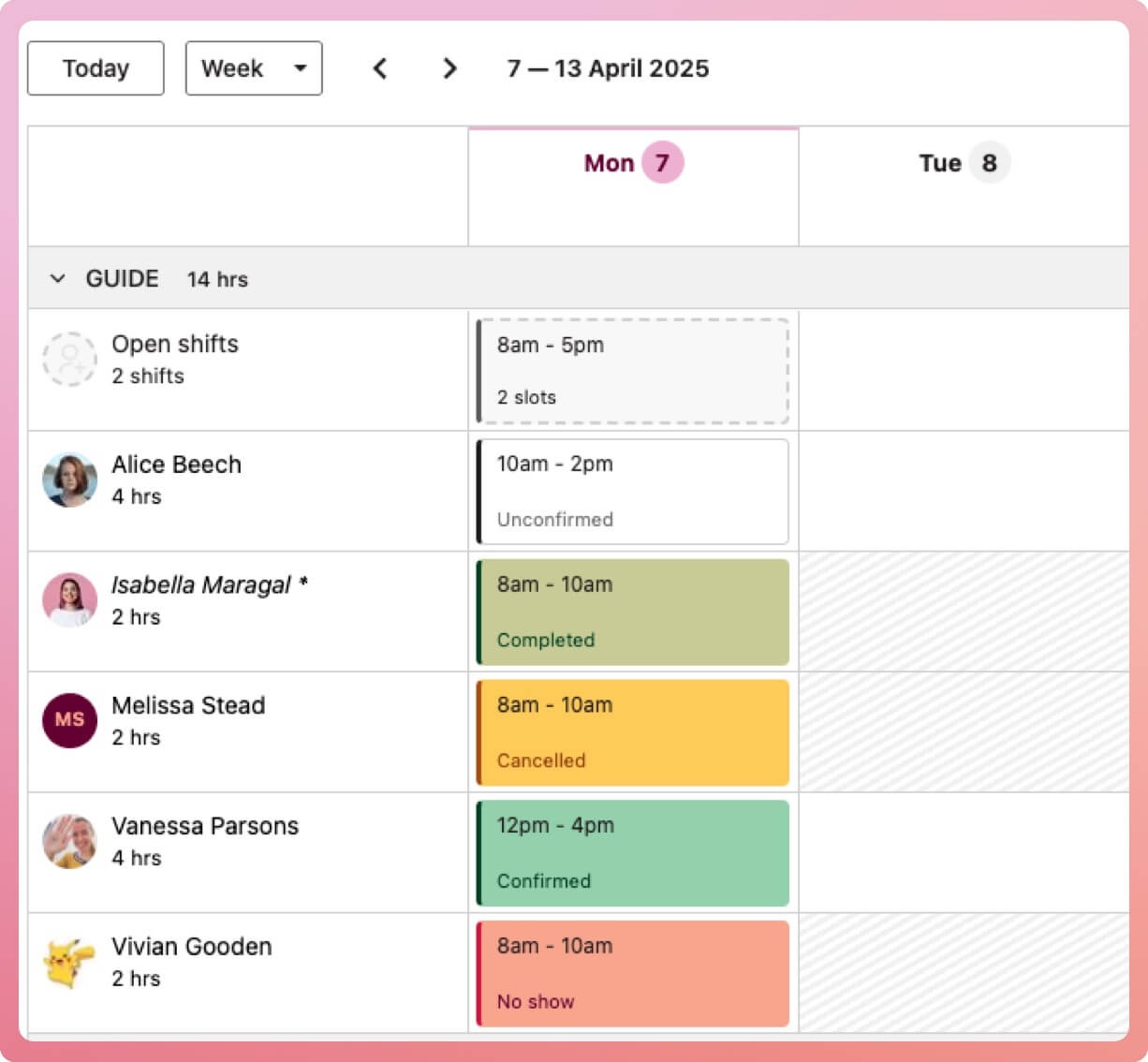
INVOLVE will only create a timesheet for Vanessa's shift, as it is the only shift with the status of 'confirmed'.
👉🏻 What about Isabella? I changed her shift status to 'completed' before the end of today, which means INVOLVE will not create a timesheet for her. To create a timesheet for this shift, I can select the shift and, in the popover, select the 'Create Timesheet' button.
Remember: INVOLVE will only create a timesheet for today's confirmed shifts. It will not pick up any shifts created or changed for yesterday or tomorrow. Nor will it pick up shifts with a status other than confirmed.
Timesheets from the Clock-on tool
Users on the Essentials or Premium tier can access and utilise the Clock-on tool, which generates a timesheet when a volunteer is clocked on and off. This tool can be used by a manager or the volunteers themselves.