
How to use the Time Recorder tool
The Time Recorder tool is available to volunteers without needing a login to INVOLVE. It allows them to submit the hours they have volunteered in a program as a timesheet entry.
How to access the Time Recorder tool
You can either print/display a QR code for volunteers to scan on their own devices or you can send them a link straight to the program Time Recorder form. There is a different recorder per program so hours are assigned correctly.
-
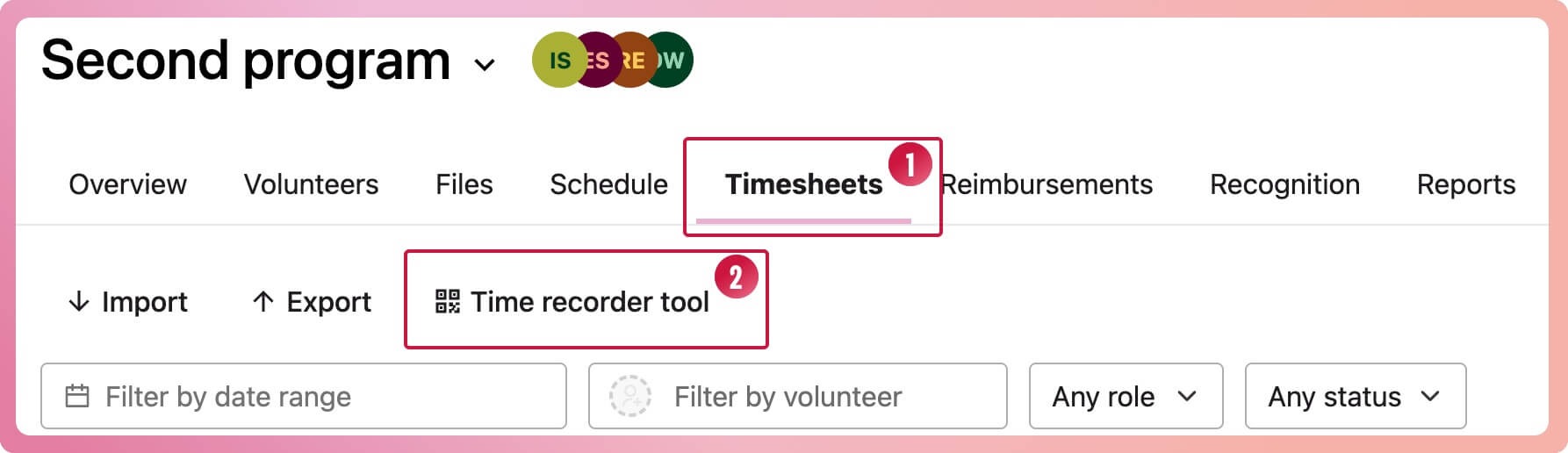
Navigate to the program and select the Timesheets tab
-
Select the Time Recorder button
-
When the new tab loads you will be presented with a QR code.
-
Print/display this QR code so volunteers can use their own devices to scan the QR code and access the timesheet form.
-
Select the link below the QR code to open the timesheet form, copy the URL and message this to the volunteer
👉🏽 A volunteer help article on how to submit timesheets using the Time Recorder is available to send to your volunteers.
Where can I see the submitted timesheets?
Timesheets submitted by volunteers will appear on the Timesheet tab of the corresponding program.
-
Navigate to the program
-
Select the Timesheets tab to view all timesheets
⭐ TIP: All timesheets automatically created using the Clock-on tool will have a status of Submitted. Timesheets with a status of Submitted or Approved will appear in reports.