Sharing a file with volunteers
You can upload a document (like a pdf) or an image to INVOLVE and share a link to this with your volunteers. Sharing a link to the one file ensures everyone is accessing the most up-to-date file as you can replace the file with a new version if need be.
First, upload the file
- Navigate to My organisation (Or a program) and select the Files tab
- Select the upload button, then select the upload file link from the menu
- Select your file and select Upload.
Second, turn on public sharing
- Select the document, and when the off-canvas slide-out appears, select the edit icon
- Below the description box, under Access, turn on the Shared with anyone with the link (public) switch (so it turns green)
- Select the Save button at the bottom of the slide-out
- Select the link icon (next to the edit icon) to copy the public URL

Finally, send it to your volunteers
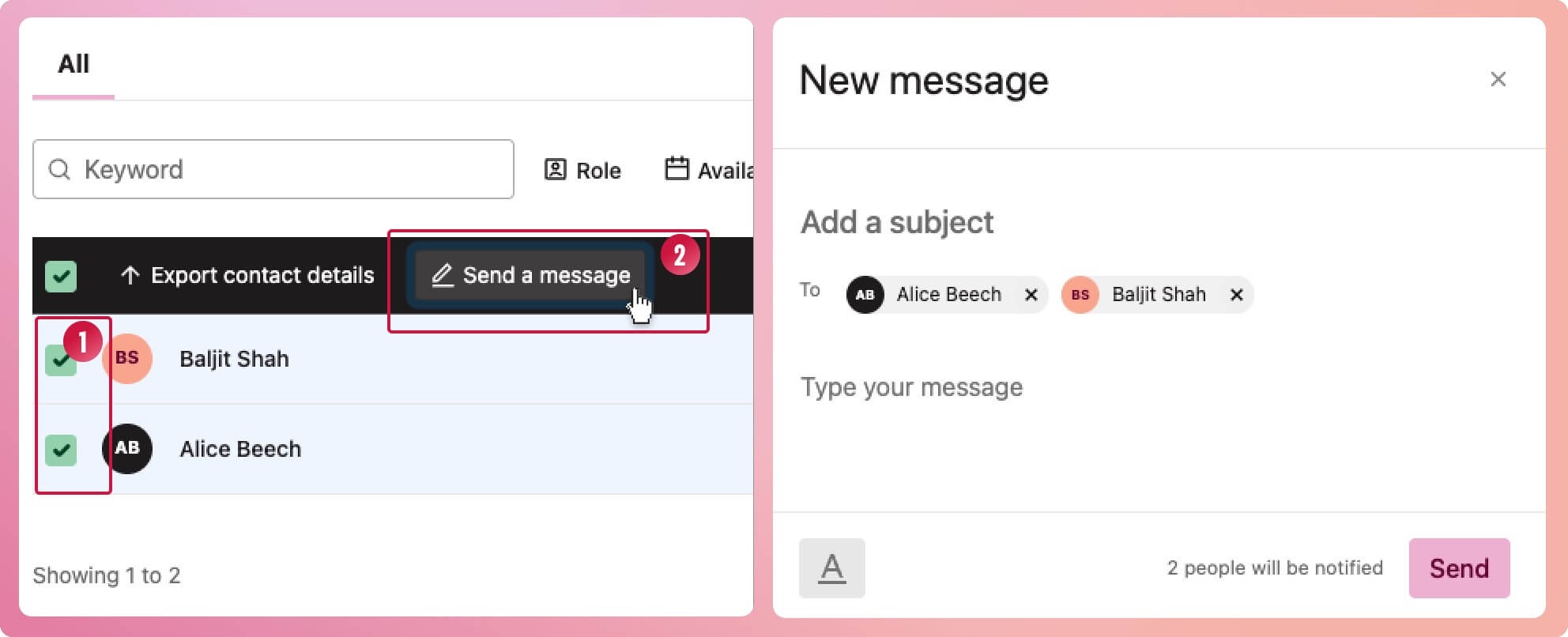
- Navigate to My Volunteers (or the Volunteers tab in your program)
- Select volunteer(s) from the volunteer list
- Select the Send a message button
- When the New message modal appears, add a subject and paste the link to the file in your message
- Select the Send button at the bottom of the modal to send the link out