
Working with volunteer statuses
What is the status of a volunteer?
Anything you like! We have three main groups of statuses: Pending, Active, and Inactive. We also provide three starter statuses, one in each group: 'Onboarding', 'Available', and 'Unavailable', that you can customise and add to. For example, you can add a new Inactive status 'On holidays' or divide up the Available into 'Available for events' and 'Available weekly'.
The volunteer status is set organisation-wide and will appear in their profile in any program they are involved in.
How to set a volunteer's status
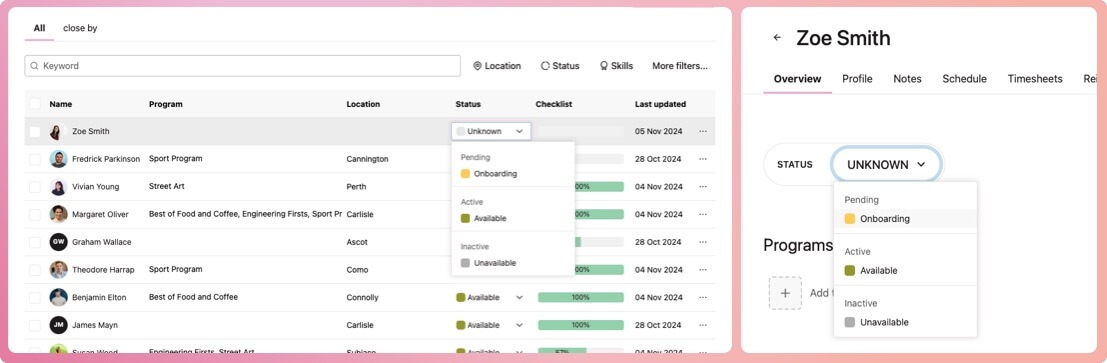
To begin with, the status of a new volunteer is set at 'unknown'. You can change this from either the My Volunteers view or the Volunteer record view by selecting the current status and then selecting a new one from the dropdown.
No other changes are made to the volunteer. Statuses are changed in the 'My Volunteers' section and are viewable, but not editable, in the volunteer's record accessed from programs they're in.
Note: Program Coordinators cannot set a volunteer's status, as the status is shared organisation-wide, not just the program in which they are involved.
How to customise my organisation's volunteer statuses
Only Billing Owners and Organisation Administrators can customise statuses.
-
Navigate to My Organisation
-
Select the Settings tab
-
Select the Volunteer Statuses row
-
When the modal appears, add, remove or edit the statuses
Note: If you remove a status that is in use, you will be asked what you would like to do with the volunteers who use that status.