
How to add volunteers
There are several ways to add volunteers to INVOLVE, either through My Volunteers or through individual programs.
Adding a new volunteer record from My Volunteers
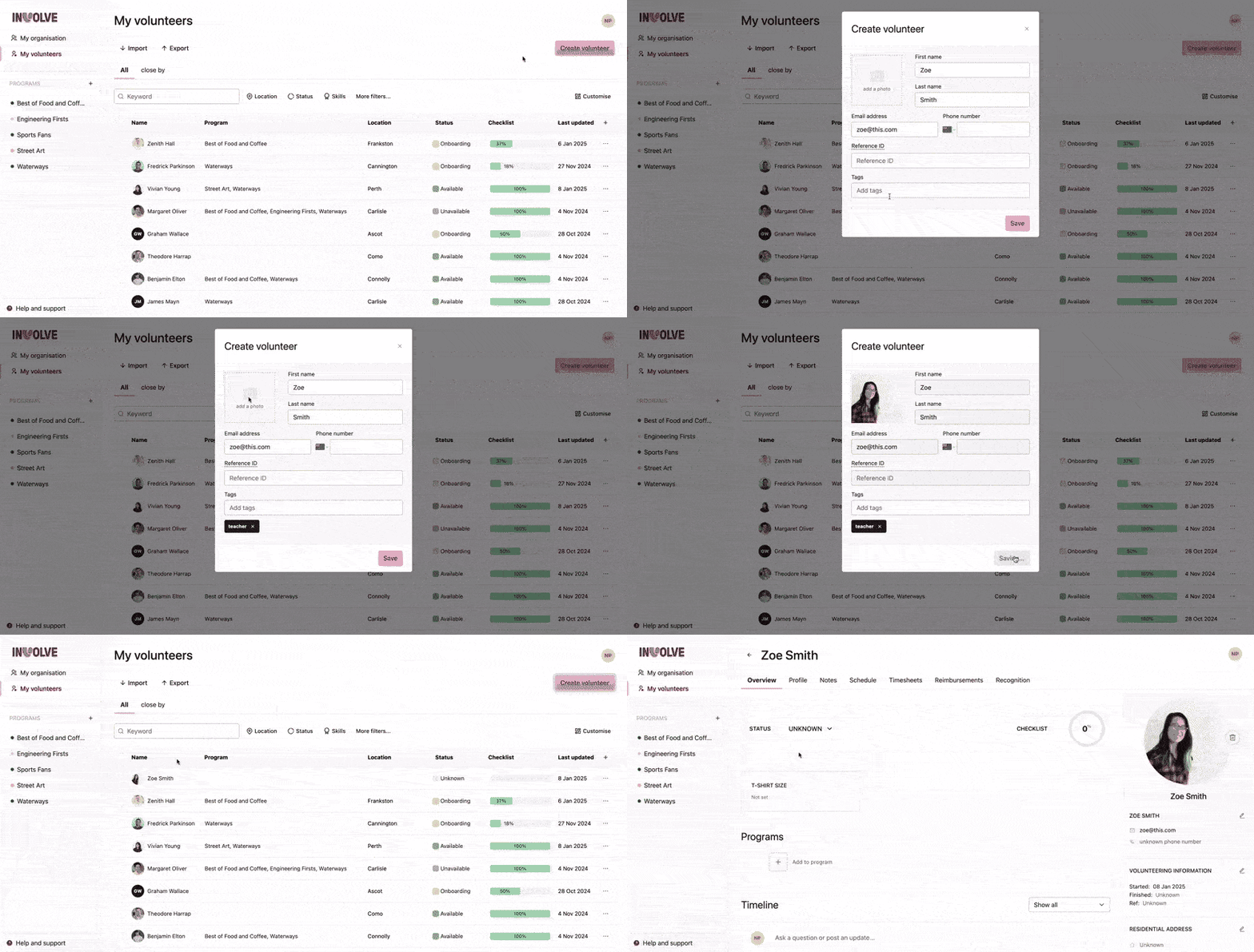
-
Navigate to My volunteers
-
Select the Create Volunteer button
-
Fill in at least one field to identify the volunteer in the modal that appears
-
Select the save button at the bottom of the modal
⭐ Done! ⭐
Note: If your role is Program Coordinator, you will not be able to add volunteers
Importing Multiple Volunteers at Once
You can use the import function from My Volunteers to bulk upload volunteer data from a CSV. We have included a neat example download to help you know exactly how to organise your file. Once uploaded, our data mapping model will prompt you to confirm that the correct data is being directed to the right fields.
The import function is located in My Volunteers and also in each program's volunteers view.
Creating a volunteer record from a Program
-
Navigate to your program and select the Volunteers tab
-
Select the Add Volunteers button
-
When the modal appears, select the link Create new volunteer
-
Fill in at least one field to identify the volunteer in the modal that appears
-
Select the Save button at the bottom of the modal
⭐ Done! ⭐
This new volunteer is in both this program and the organisation's volunteers list*
* If your role requires new volunteers to be reviewed by a Volunteer Manager, then the new volunteer will not appear in the program until the Volunteer Manager has accepted them.