
Changing your subscription
Note: Only Billing Owners can make changes to subscriptions and billing information. There is just one Billing Owner per organisation.
Upgrading or downgrading your subscription tier
-
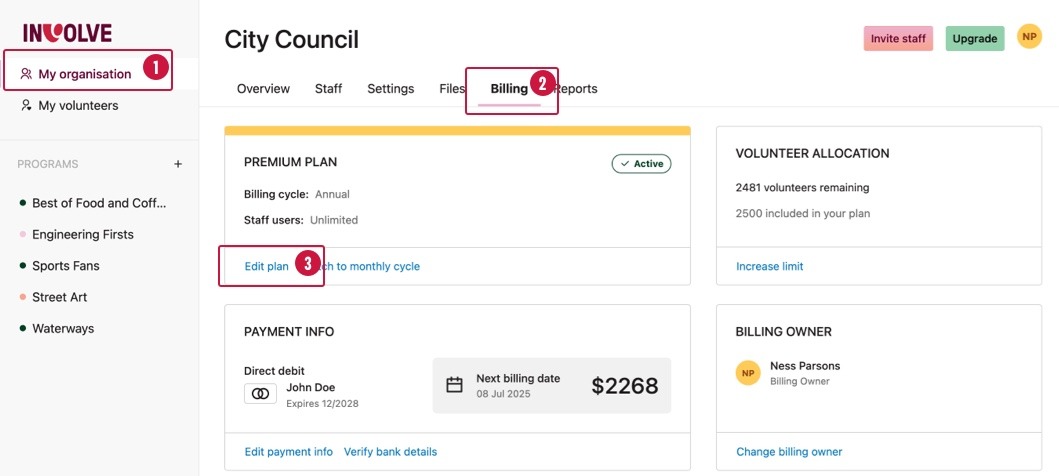
Navigate to the My Organisation section
-
Navigate to the Billing tab
-
Select the 'Edit plan' link located under the current plan's details
-
When the Edit plan modal appears, select the 'Need to upgrade or downgrade your plan tier?' link at the bottom
-
You will find yourself on a page where you can see all the tiers available and their features. Your current tier is indicated, too. Choose your new tier.
Increasing the volunteer limit
When you are happy with the tier, but you require more volunteer records, you can opt to increase just the limit of volunteers.
What are the options?
Starter plans can choose the following volunteer limits:
-
25 volunteers (base limit for the Starter tier)
-
75 volunteers
Essentials plans can choose the following volunteer limits:
-
100 volunteers (base limit for Essentials tier)
-
250 volunteers
-
500 volunteers
Premium plans can choose the following volunteer limits:
-
2500 volunteers (base limit for the Premium tier)
-
unlimited volunteers
How to increase or decrease your volunteer limit
-
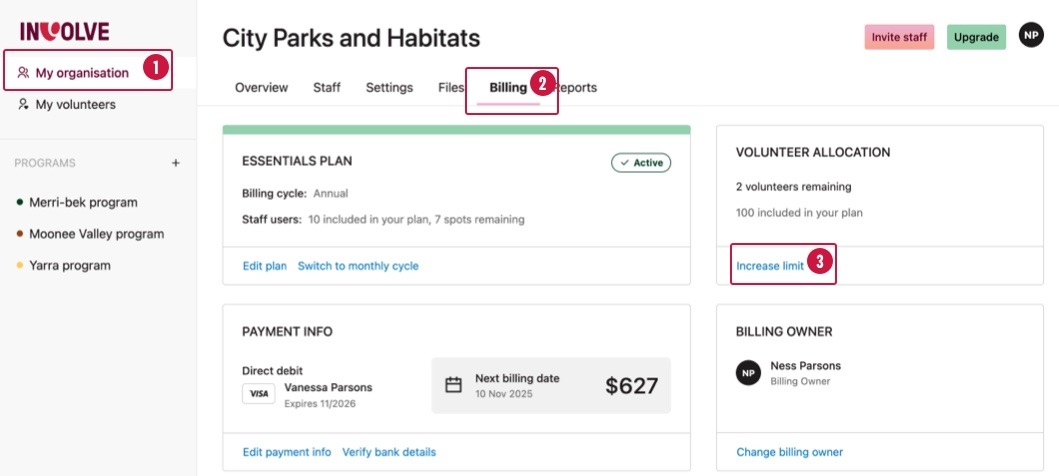
Navigate to the My Organisation section
-
Navigate to the Billing tab
-
Select the 'Increase limit' link located under the volunteer allocation details
-
When the Edit Plan modal appears, select the Volunteer Limit dropdown and choose the new volunteer limit.
Note: Only the Billing Owner can increase the volunteer limit