
Cancel plan
As the Billing Owner, you can cancel your plan at any time. Here is how
-
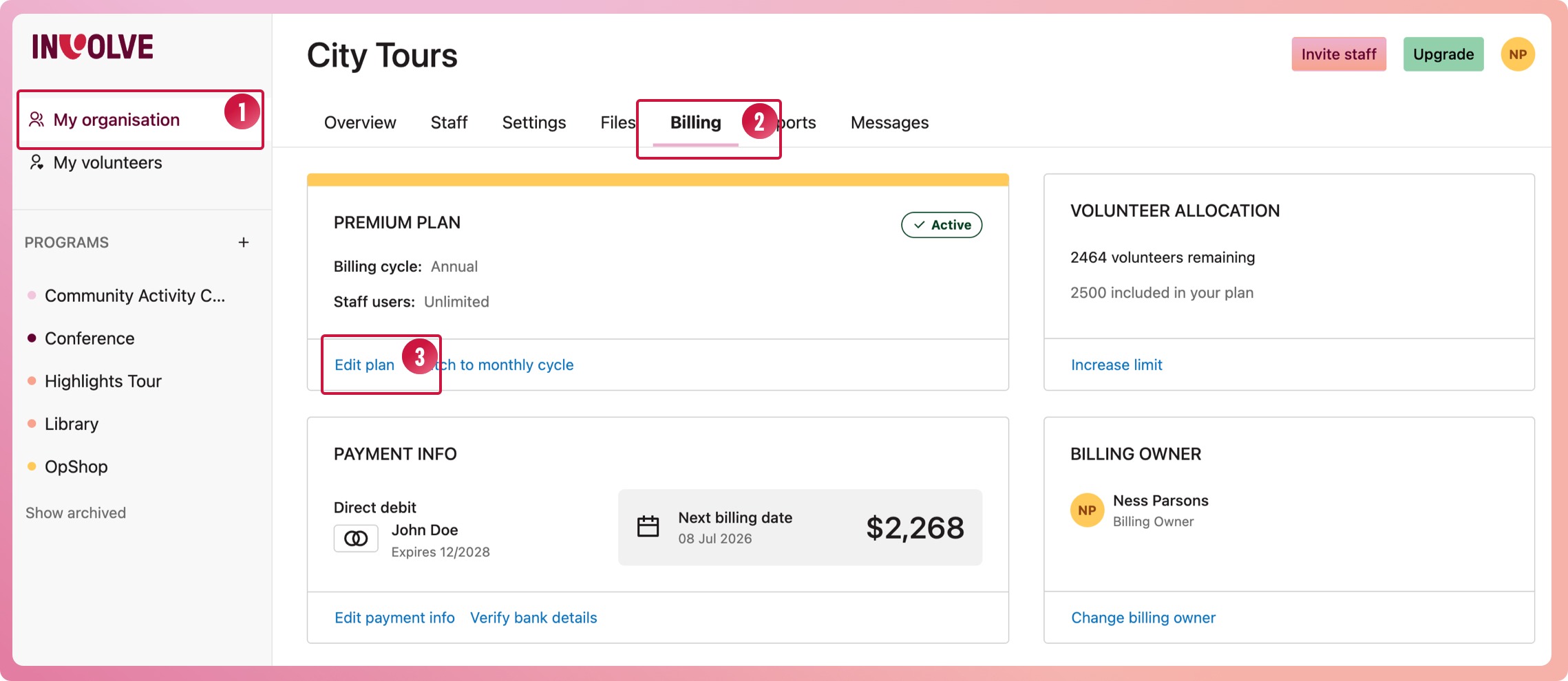
Navigate to My organisation
-
Select the Billing tab
-
In the first box, select the edit plan link
-
When the modal appears, select the "Need to cancel your plan?" link at the very bottom
-
Select Cancel plan immediately
❗Important note: Ensure any data you need is downloaded before cancellation
What happens when you cancel your account
If you have a paid subscription, any remaining time will be forfeited, so it is best to cancel just before your next billing date. To find out your next billing date, head to the Billing tab and check the Payment Info box.
For privacy reasons, data for a cancelled account is deleted. This means any data that needs to be kept should be exported before cancelling.
If eligible, you could downgrade rather than cancel. A free account lets you store data for up to 25 volunteers.
What happens to the data when an account is cancelled
We take the privacy of your data seriously. Your data will be deleted from INVOLVE's storage during the scheduled cleanup routines. If your data is sensitive and requires immediate deletion, don't hesitate to contact us.
What if you change your mind after cancelling?
This is tricky. Please get in touch with us right away, and our team will check whether it is still queued to be deleted and can be restored.