Finding expired or missing certificates
How to know which volunteers are missing certificates
Need to know which of your volunteers are missing their Police Clearance or other certificate?
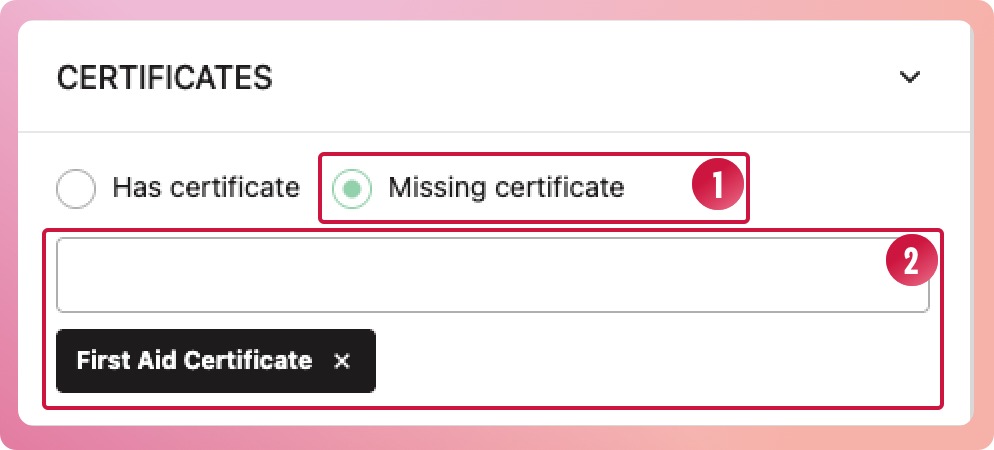
- Navigate to your program and select the Volunteer's list. Select the More filters... button to open the filter slide-out panel. Open the certificates section and select the Missing certificate radio button
- Select the certificate type from the second drop-down.
- Select the Apply filters button at the bottom of the slide-out panel
- The results will show volunteers who do not have that certificate on their profiles.
How to know when a certificate has expired
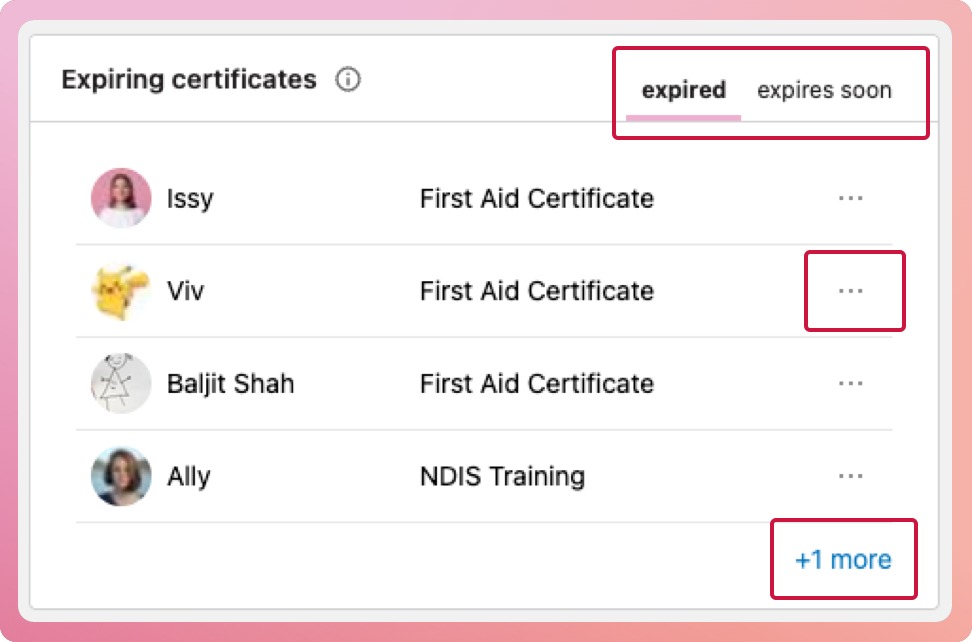
We have made this easy for you by providing a short list in the Overview of each program that highlights volunteers with expired or expiring soon certificates.
- When you navigate to a program, you should land on the Overview tab.
- On the Overview tab, below the program brief is a box titled 'Expiring Certificates'. This box has two tabs, each showing a list of volunteers: one for those who are expired and another for those who are expiring soon.
- The list will show the first four volunteers; if there are more, it will provide a link to a filtered view of the volunteer list.
- You can quickly bring up the certificate modal by selecting the three-dot icon and choosing "Add New Expiry Date" from the context menu.