
Holiday 2025 release notes
We've been working through the holiday break to deliver some great enhancements. Here's what we've done:
✨ New Features
✨ Unified volunteer availability
What's new
We’ve moved volunteer availability management from the program-level to the organisation-level. This means that instead of setting different availability for each volunteer across multiple programs, you’ll now manage all volunteer availability from one central source.
Benefits
-
Centralised Control: All volunteer availability is now centrally stored yet still accessed from multiple locations
-
Consistent Scheduling: When a volunteer is unavailable, they’re unavailable across all programs
-
Simplified Workflow: Set availability once per volunteer instead of per program
-
Better Oversight: Volunteer Managers have full visibility into volunteer availability patterns
How It Works
While we've changed how availability works behind the scenes (moving from program-level to organisation-level scope), your day-to-day workflow for managing volunteer availability remains flexible. You can still set and edit volunteer availability from multiple locations:
Organisation Level:
-
From the "My Volunteers" section - either on individual volunteer records or inline on the list page
Program Level:
-
From each program's "Volunteers" tab
-
From individual program volunteer records
Important: No matter where you make changes, the availability will now apply consistently across your entire organisation, giving you the best of both worlds: flexible access points with unified data.
📍 Migration Process: read how we've migrated your volunteer's availability.
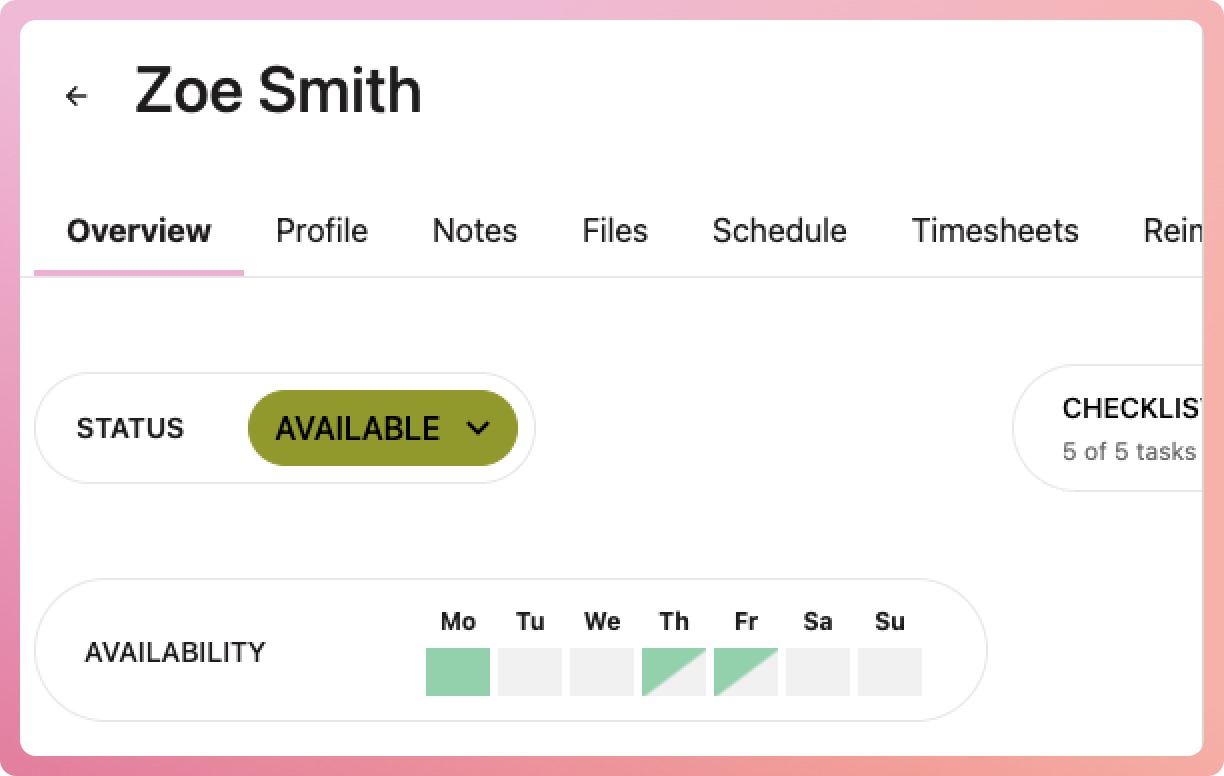
✨ Partial day availability
We've also introduced partial availability settings, giving you more granular control over volunteer scheduling.
What's New
-
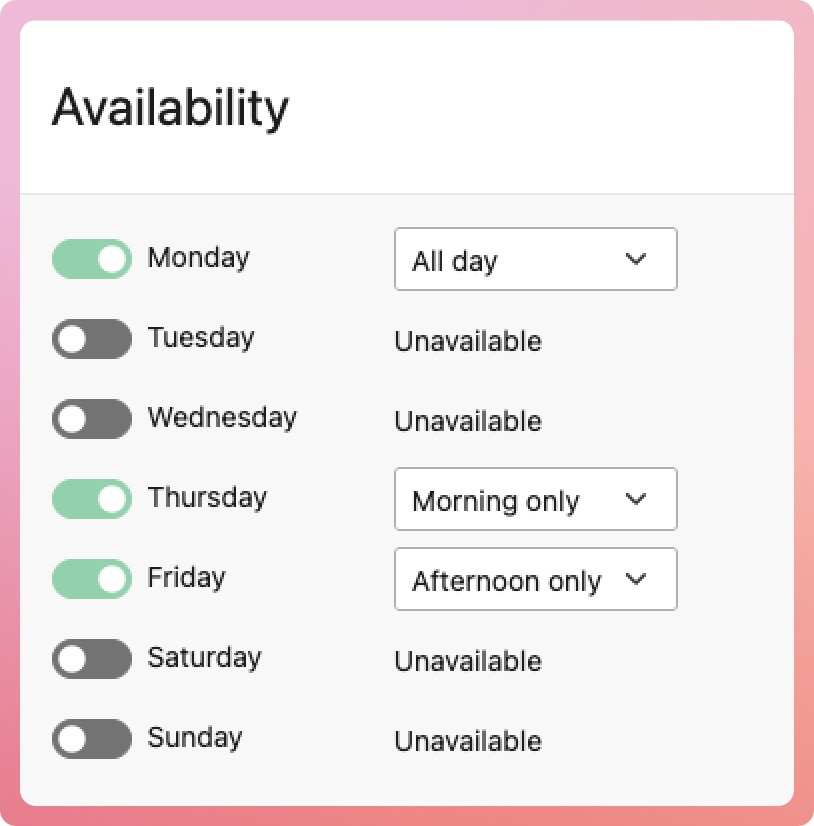
Morning/Afternoon Periods: Indicate whether volunteers are available for morning shifts, afternoon shifts, or both
-
Enhanced Search: Find volunteers based on their partial availability to match your program's specific time requirements
Benefits
-
Better Matching: Assign volunteers to shifts that align with their preferred time periods
-
Improved Utilisation: Make the most of volunteers who may only be available for part of the day
-
Efficient Scheduling: Reduce scheduling conflicts by specifying exactly when volunteers are available
How It Works
When setting volunteer availability, you can now choose:
-
Morning only - Available for morning shifts
-
Afternoon only - Available for afternoon shifts
-
Both options, i.e. all day - Available for both morning and afternoon shifts
Use the search and filtering tools to find volunteers whose partial availability matches your program's scheduling needs.
🚀 Improvements
Change the Program Owner
Staffing changes happen often, so we’ve made it easy to update who is in charge of a Program. To change the Program Owner, go to the Program Overview page and find the Program Team section. Click on a team member, and you’ll see an option to set them as the owner. Both the current Program Owner and Organisation Admins can do this.
Extra reminder for payments
To help make sure your service continues smoothly, in addition to the in-app notifications, we’ll now send an email to the Billing Owner. This way, they won’t miss when payments are over due.
🐛 Bug Fixes
As usual, we've squished some bugs so that you don't run into those nasties.