
July 2026 release notes
After an inspiring 3 days at the National Volunteering Conference in Adelaide, we are re-energised to improve INVOLVE for the Australian NFP sector. This month we pumped out lots of small improvements along with some great internal and customer planning sessions for future features!
⭐ New Feature
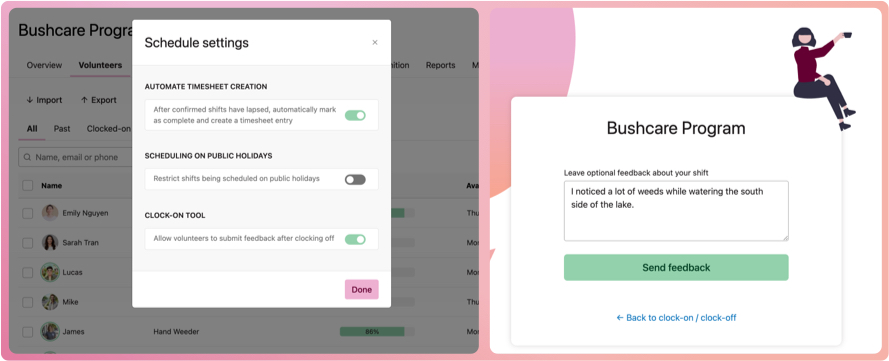
Volunteer Feedback when using the clock-on tool
This feature was co-created with thanks to funding and input from the City of Stirling.
You can choose to collect feedback when volunteers clock off their shift. This new feature makes it easier to capture shift-specific notes, outcomes, or observations at the point of attendance. Collecting this information can help improve volunteer support, program management, and provide valuable context for completed shifts.
Take a look:
- Navigate to a program
- Select the down chevron icon next to the program name to activate the context menu
- Select Schedule settings
- When the schedule settings modal appears, turn on the switch for allowing feedback, then close the modal
- Navigate to the schedule and select the clock-on tool. Select the link below the QR code. Practice clocking on and then off one volunteer and entering a comment.
- Back in the program, select the Timesheet tab and notice the new timesheet with a comment icon. Select to view the feedback you entered.
- Delete this timesheet so it doesn't end up in your reports!
🚀 Improvements
Program-level settings
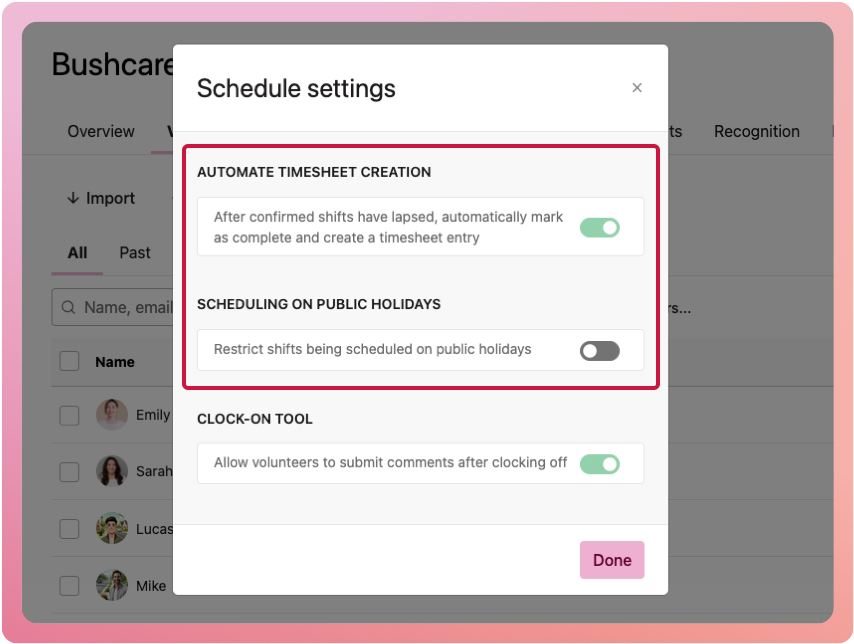
We have moved automatic shift completion and timesheet generation to the program level. We also moved the schedule restriction for public holidays to the program level. Previously, these settings applied organisation-wide, across all programs, which caused challenges for those running programs with different attendance and timesheet requirements. Moving these to the program level gives you greater flexibility to tailor program management to each program.
Take a look:
- Navigate to a program
- Select the down chevron icon next to the program name to activate the context menu
- Select Schedule settings
- When the schedule settings modal appears, turn on or off the automate timesheet creation and/or scheduling on public holidays switches
Assign roles faster
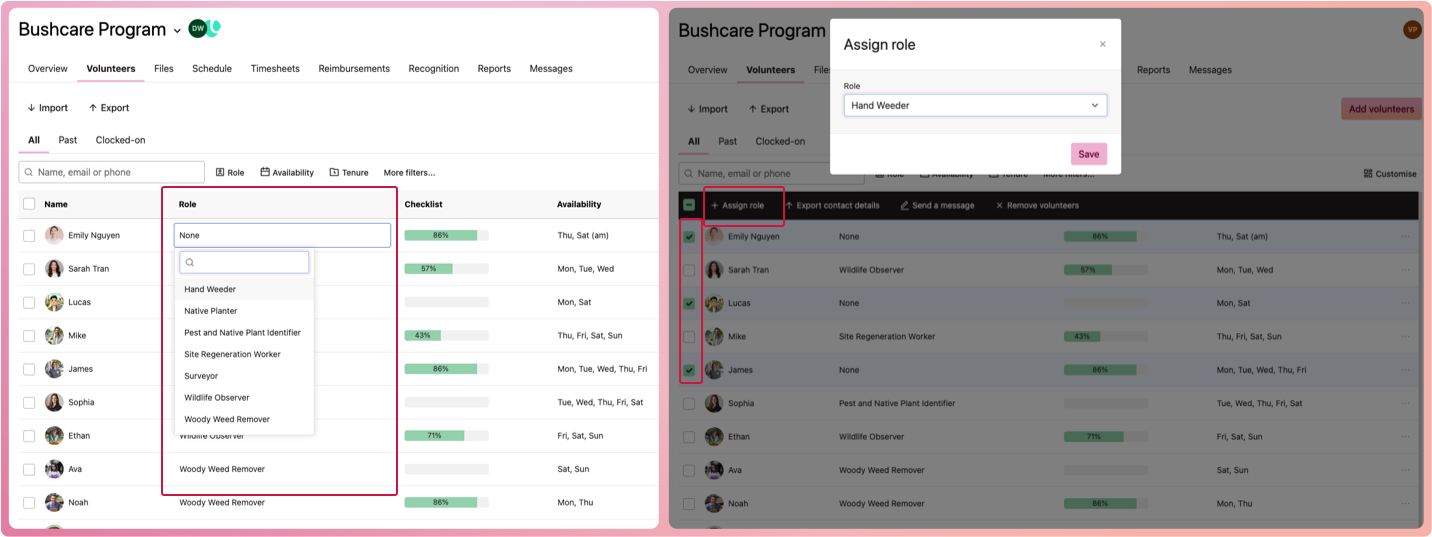
You can assign volunteer roles directly from your program's volunteer list, eliminating the need to open each volunteer's profile. We've also introduced a bulk role assignment feature that lets you assign roles to multiple volunteers in a single action. These will help reduce admin time and get you up and running faster!
Take a look:
- Navigate to a program and select the Volunteers tab
- On the right-hand side, select the Customise button and, in the slide-out, turn on the Role switch. This will show the volunteer's role in the list. Close the slide-out
- For each volunteer, select the Role column cell and then select or search for their role
- Or, for bulk assigning, select one or more volunteers by ticking their checkboxes, then in the bulk action (black) bar, select Assign role. This will open the assign role modal, where you can select their roles.
Additional (but still awesome) improvements
Simplicity is hard to achieve, but that is our mission. Here are a few small improvements to make your daily work-life better:
- A little x at the end of keyword search boxes to help you clear a search term faster than backspacing
- Search for files by their name, description, any of their tags, the type of file or who was the last staff member to modify the file
- Keyword search on volunteer notes
- You no longer need to select a program when inviting a new Program Coordinator or Program Manager staff member
- Upload a docx file type for a certificate
🐛 Bug Fixes
Various bug fixes and performance improvements to keep INVOLVE running smoothly for you.