
May 2026 release notes
Hello May! 2026 is certainly zooming by. We are getting ready to attend the National Volunteering Conference in Adelaide next month to hear inspiring learnings in the volunteering field and talk to you in person. If you see us, come say hi!
New Features
💃 Volunteer contribution hours
You can now view a volunteer's contribution, providing a clearer picture of each volunteer's hours dedicated to your organisation. This will help with recognising volunteer impact, reporting and understanding engagement.
You will have two different areas to view this: one at the program level, which shows the total number of timesheets submitted for that program, and one at the organisation level, which shows a summary of their involvement across all programs.
Take a look:
- Navigate to your list of volunteers (My Volunteers or program volunteers)
- Select the customise button
- In the slide-out, switch on the contribution line to show the column in the volunteers list.
- Close the customise slide-out and select the more filters... button
- In the slide-out, open up the contribution filter and enter a more than and/or a less than number (hours). Eg. more than 10. and select the Apply filters button.
- Select a volunteer and view their contributed hours on their overview, too.

🌟 Helping volunteers stay organised and see their impact
Volunteers can now add shifts straight to their Google, Apple, or Outlook calendars, making it easier to stay on top of commitments and reducing missed attendance.
We’ve also introduced a simple view of total hours contributed, so volunteers can see the time they’ve given and better understand the impact they’re making.
Take a look:

🚀 Improvements
New look for open and requested shifts
We've enhanced the schedule UI (user interface) to make it easier to distinguish between open shifts and open shifts with requests pending. This includes a progress bar to indicate the "fullness" of the open shift slots. We also changed the look of the assigned requested shifts to be more eye-catching.
These updates improve clarity and help reduce confusion when managing busy schedules and requests on open shifts.

Confidential Volunteer Notes
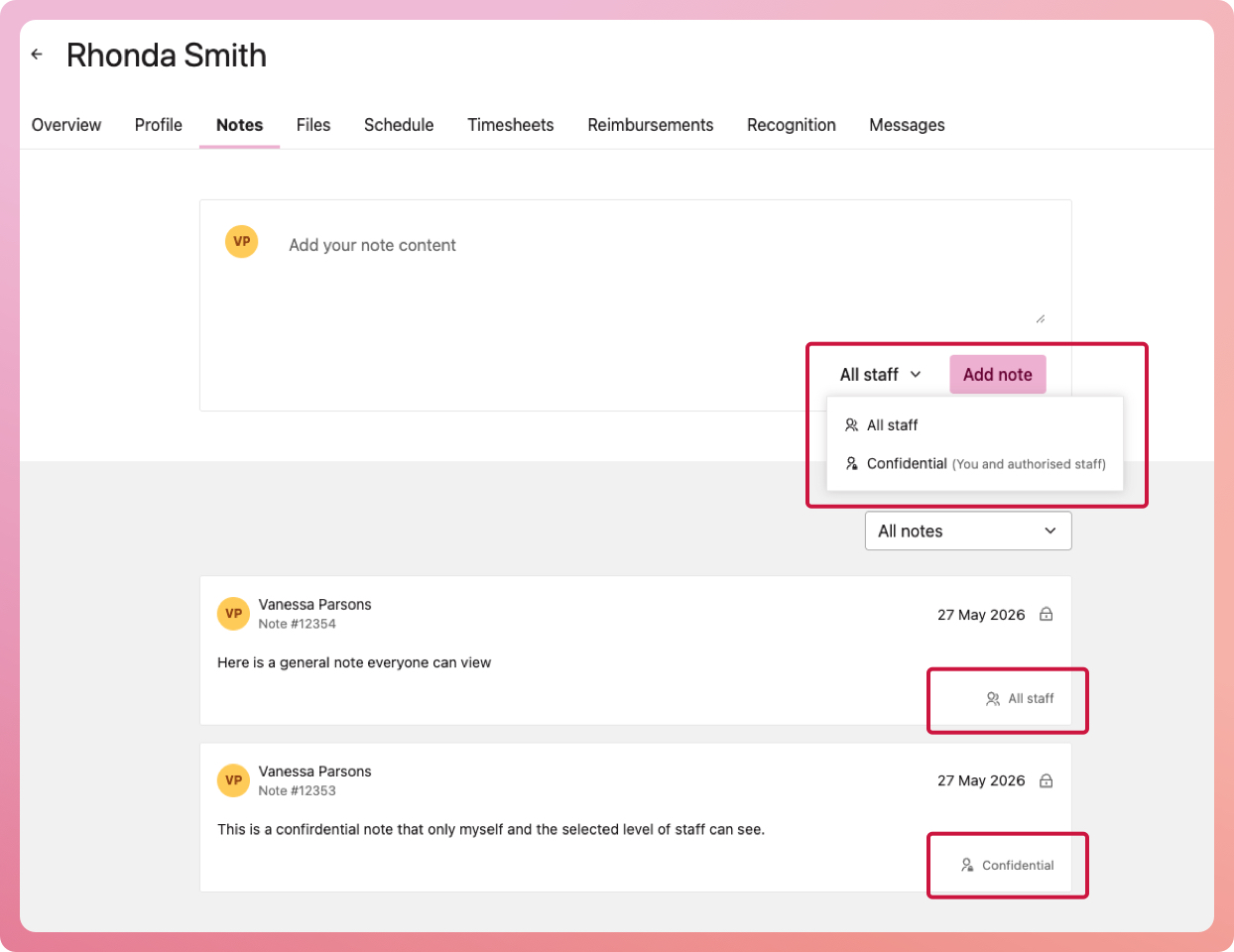
You can now apply permission levels to volunteer notes, allowing you to control who can view sensitive information. It ensures better privacy when recording sensitive details and a clearer separation between general and confidential notes.
To set up which staff access level can see confidential notes, head to My Organisation > Settings and under 'Security & Permissions, select 'Confidential notes. Select either Organisation Manager, Volunteer Manager or Program Coordinators (i.e., everyone can see)
Take a look:
- Navigate to your list of volunteers (either My Volunteers or Program volunteers)
- Select a volunteer to bring up their record and select the Notes tab
- Besides the 'add note' button, you have a dropdown option to select All staff or Confidential
Secondary Email & Phone support
You can now collect, store and export a secondary email address and phone number for each of your volunteers. This is especially useful for volunteers with multiple contact methods, such as students, and for improving the reliability of communication.
Take a look:
- Bring up a volunteer's record
- Edit their personal details and view the new input fields ready to go!
🐛 Bug fixes & stability improvements
We have addressed several minor issues and improved the overall reliability and performance of INVOLVE. Thank you for your time to report what you see. We really appreciate it 💚
🥁 Coming soon: Volunteer application forms!
This will be a big release very soon! We have had so many requests for this, and we have worked hard to bring it to you in true INVOLVE style: simple and intuitive.
Right now, we have a few organisations giving it a good test run. If you are one of these organisations, you will notice a few new tabs and features being added in this release, including the ability to edit your form fields and text areas. - Send your feedback